
Last updated on
Oct 31, 2026
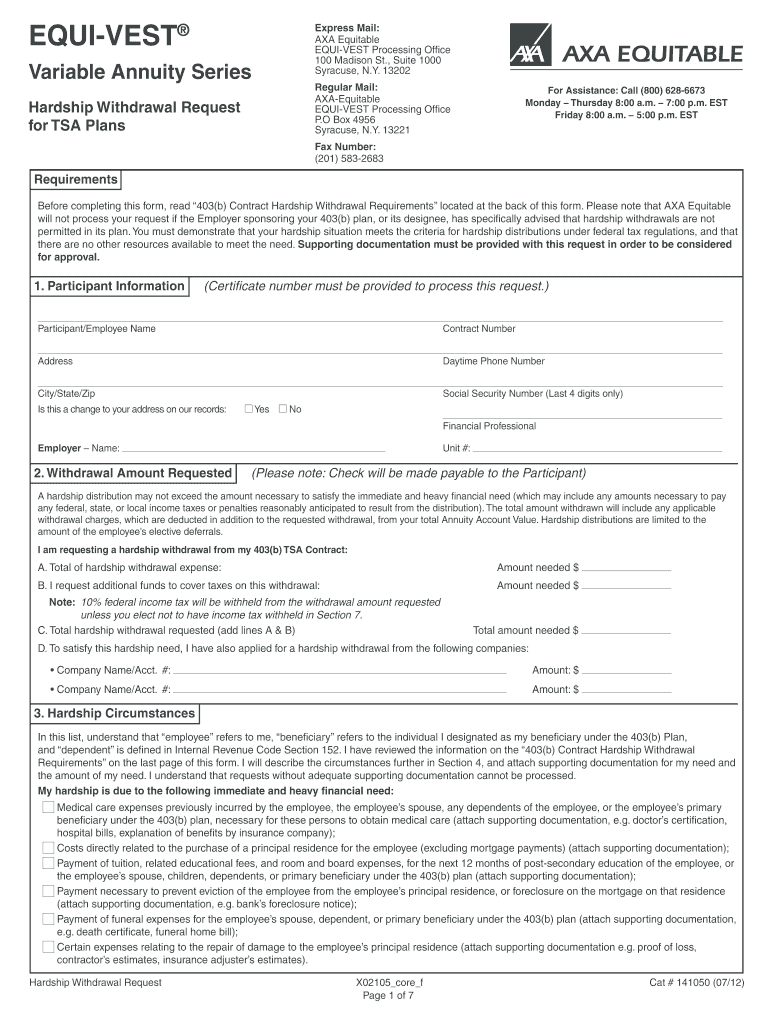
AXA Hardship Withdrawal Request 2012-2026 free printable template
pdfFiller is not affiliated with any government organization

Fill out
Complete the form online in a simple drag-and-drop editor.

eSign
Add your legally binding signature or send the form for signing.

Share
Share the form via a link, letting anyone fill it out from any device.

Export
Download, print, email, or move the form to your cloud storage.
Why pdfFiller is the best tool for your documents and forms


End-to-end document management
From editing and signing to collaboration and tracking, pdfFiller has everything you need to get your documents done quickly and efficiently.
Accessible from anywhere
pdfFiller is fully cloud-based. This means you can edit, sign, and share documents from anywhere using your computer, smartphone, or tablet.
Secure and compliant
pdfFiller lets you securely manage documents following global laws like ESIGN, CCPA, and GDPR. It's also HIPAA and SOC 2 compliant.
What is AXA Hardship Withdrawal Request
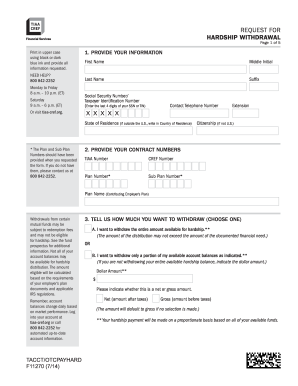
The AXA Equitable 403(b) Hardship Withdrawal Request is a financial document used by participants to request hardship withdrawals from their 403(b) TSA plans due to immediate financial needs.
pdfFiller scores top ratings on review platforms




So easy to use.....I was in need of a Quitclaim Deed for mineral rights, and PDFfiller was the only site that offered the form that I needed. What a find!
only things so far I've wished for is the ability to add, delete, or copy pages already in my forms.
Who needs AXA Hardship Withdrawal Request?
Explore how professionals across industries use pdfFiller.

AXA Hardship Withdrawal Request is needed by:
-
Employees participating in a 403(b) TSA plan
-
Spouses of participants for consent requirements
-
Financial advisors assisting clients with withdrawals
-
Human resources professionals managing employee requests
-
Plan administrators overseeing withdrawal processes
Comprehensive Guide to AXA Hardship Withdrawal Request
What is the AXA Equitable 403(b) Hardship Withdrawal Request?
The AXA Equitable 403(b) Hardship Withdrawal Request form is a specific document utilized by participants in 403(b) TSA plans to seek funds during urgent financial situations. This form focuses on "hardship withdrawal," which allows for the release of funds from a retirement account under IRS guidelines. Key terms include “financial hardship withdrawal” and “403b plan withdrawal,” essential for understanding the withdrawal process.
This form serves as a crucial tool for individuals facing critical financial challenges, enabling them to access necessary funds through a structured request process.
Purpose and Benefits of the AXA Equitable 403(b) Hardship Withdrawal Request
The AXA Equitable 403(b) Hardship Withdrawal Request is vital for individuals confronting severe financial difficulties. By allowing access to retirement funds, this form underscores the importance of withdrawing assets to address pressing needs. The primary benefits of using this form include a streamlined process specifically designed for hardship situations, which may be more advantageous than other financial alternatives.
Utilizing the AXA Equitable withdrawal request can significantly alleviate some financial burdens, providing quicker access to funds without the complications of less structured withdrawal methods.
Who Needs the AXA Equitable 403(b) Hardship Withdrawal Request?
This form is essential for participants in 403(b) TSA plans who are eligible to request a hardship withdrawal. It is important for individuals who meet specific criteria set by the IRS to understand their need for this form. Furthermore, there are co-signing requirements for spouses that participants must be aware of to ensure the application is valid and considered.
Eligibility Criteria for the AXA Equitable 403(b) Hardship Withdrawal Request
To qualify for the AXA Equitable 403(b) Hardship Withdrawal Request, participants must meet certain conditions defined by IRS guidelines. These criteria often include financial hardships such as:
-
Medical expenses for the participant or their dependents
-
Costs related to the purchase of a primary home
-
Tuition and educational fees for the upcoming academic year
-
Payments necessary to prevent eviction from or foreclosure on a primary residence
Specific circumstances will dictate eligibility, ensuring participants are fully informed before applying.
How to Fill Out the AXA Equitable 403(b) Hardship Withdrawal Request Online
Filling out the AXA Equitable 403(b) Hardship Withdrawal Request can be easily accomplished using pdfFiller. This process involves several steps to ensure accuracy:
-
Access the form through the pdfFiller platform.
-
Fill in the participant’s information, including name and contract number.
-
Specify the amount requested for withdrawal.
-
If applicable, complete the spousal information section.
Be aware of common mistakes, such as incorrect amounts or missing signatures, which could delay the processing of your request. Correct completion is essential to meet the requirements of both the plan and the IRS.
How to Notarize and Submit the AXA Equitable 403(b) Hardship Withdrawal Request
Notarization is a crucial step in the AXA Equitable 403(b) Hardship Withdrawal Request process. Participants must ensure that their signatures, along with their spouse's signatures if required, are properly notarized. This can be done digitally or through a traditional wet signature, depending on the preferred method.
After notarization, submitting the completed form effectively is key. Options may include mailing the form or submitting it through designated electronic channels, ensuring it reaches the appropriate department.
Required Documents and Supporting Materials for the Withdrawal Request
To accompany the AXA Equitable 403(b) Hardship Withdrawal Request, participants must provide specific supporting documents to verify their hardship. Essential documents may include:
-
Medical bills or receipts
-
Loan statements related to home purchase
-
Tuition invoices for educational fees
-
Eviction notices or foreclosure documentation
Assembling all necessary documents is vital for a complete submission and can significantly expedite the review process.
What Happens After You Submit the AXA Equitable 403(b) Hardship Withdrawal Request?
After submitting the AXA Equitable 403(b) Hardship Withdrawal Request, participants will receive a confirmation receipt indicating their submission has been received. Tracking this submission can be done through the available channels provided by AXA Equitable.
Processing times may vary, but participants can typically expect a timeline detailing when they might receive a response regarding their request. Understanding these potential timeframes can help manage expectations during the waiting period.
Security and Compliance When Submitting Your Form
When submitting sensitive documents like the AXA Equitable 403(b) Hardship Withdrawal Request, security is paramount. pdfFiller provides robust security features, including 256-bit encryption, to protect personal data during the form-handling process. Additionally, the platform is compliant with various regulations, such as HIPAA and GDPR, ensuring that participants' privacy is upheld throughout the process.
Streamline Your AXA Equitable 403(b) Hardship Withdrawal Process with pdfFiller
By utilizing pdfFiller, participants can enhance their experience when filling, editing, and eSigning the AXA Equitable 403(b) Hardship Withdrawal Request form. The platform offers user-friendly features that make it easier and faster to complete the necessary steps compared to traditional methods.
Accessibility, speed, and security are just a few benefits of choosing pdfFiller for navigating your withdrawal request seamlessly.
How to fill out the AXA Hardship Withdrawal Request
-
1.Start by accessing pdfFiller and searching for 'AXA Equitable 403(b) Hardship Withdrawal Request'.
-
2.Open the form in pdfFiller, which will display interactive fillable fields.
-
3.Before completing the form, gather necessary information including your name, contract number, and details of the hardship.
-
4.Begin filling in your details in the 'Participant/Employee Name' and 'Contract Number' fields using clear and accurate information.
-
5.Indicate the 'Withdrawal Amount Requested' based on your immediate financial needs.
-
6.Next, fill in the section regarding the circumstances of your hardship, providing detailed but concise explanations.
-
7.If applicable, request your spouse to fill in their required sections for consent and ensure they can notarize or have it witnessed.
-
8.Review all the information you've entered for accuracy, ensuring that all sections are completed thoroughly.
-
9.Once satisfied, finalize the form by signing in the designated area, and remind your spouse to do the same if necessary.
-
10.Look for the options to save, download, or submit directly through pdfFiller. Choose the one that best suits your submission requirement.

Who is eligible to fill out the AXA Equitable 403(b) Hardship Withdrawal Request?
Eligibility to fill out this form includes participants actively enrolled in a 403(b) TSA plan facing immediate financial hardship and their spouses who need to provide notarized consent.
What supporting documents are required with this withdrawal request?
Participants must provide supporting documentation that clearly illustrates the financial hardship being claimed, such as bills or statements indicating urgent financial needs.
Is there a deadline for submitting this hardship withdrawal request?
While specific deadlines may vary, it's important to submit your request as soon as possible as processing times can affect the timing of fund releases.
Can I submit the form online? How?
Yes, you can submit the form online using pdfFiller. After completing the form, make sure to use the 'Submit' option to send it directly to your plan administrator.
What are common mistakes to avoid when completing the form?
Common mistakes include not providing adequate explanations for the hardship, missing signatures, and neglecting to notarize the spouse's consent if required.
How long does it take to process a hardship withdrawal request?
Processing times can vary, but it typically takes several weeks. Contact your plan administrator for specific timelines based on your submission date.
What is the importance of notarizing the spouse's consent?
Notarizing the spouse's consent is crucial as it legally validates their approval of the withdrawal, helping to prevent future disputes or claims against the funds.
Related Forms




Get the latest insights from our blog


If you believe that this page should be taken down, please follow our DMCA take down process
here
.
This form may include fields for payment information. Data entered in these fields is not covered by PCI DSS compliance.